We recommend you complete this problem after completing Rotating Squares.
Six Shapes
Go back to the original Scratch project featured in Rotating Squares. Or, you can download the starter program here.
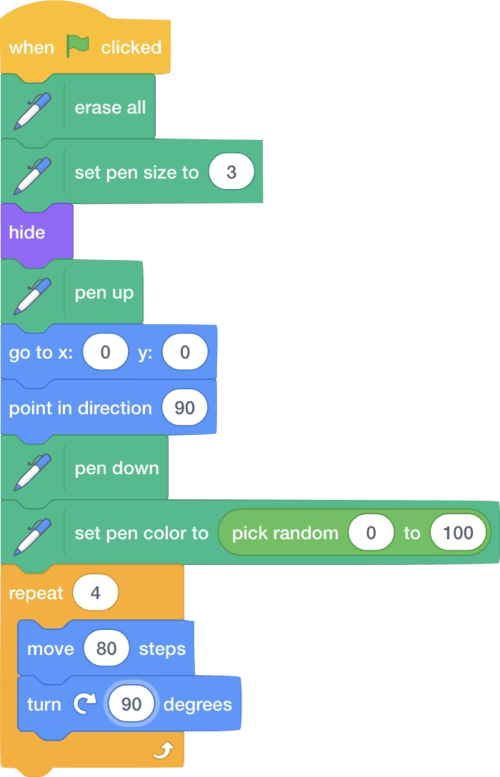
Modify this project so that instead of drawing a single square, it will instead draw a row of 6 squares, spaced apart as shown below. You’ll need to adjust the starting (x,y) coordinate so that the pen begins drawing toward the top left of the stage.

Save this project under the file named sixSquares.sb3.
Now modify your program so that instead of 6 squares, you get 6 equilateral triangles (i.e., each triangle consists of sides that are equal in length). Each triangle will contain three 60-degree angles. Save this project under the file named sixTriangles.sb3.
Now modify your program again so your program draws a row of objects containing some other number of sides (e.g., hexagons or pentagons). Save this project as a file named sixOtherShapes.sb3
How to Submit
- Go to CS50’s Gradescope page.
- Click “Problem Set 0: Six Shapes”.
- Drag and drop sixSquares.sb3., sixTriangles.sb3. and sixOtherShapes.sb3 to the area that says “Drag & Drop”.
- Click “Upload”.
You should see a message that says “Problem Set 0: Six Shapes submitted successfully!” You may not see a score just yet, but if you see the message then we’ve received your submission!