Rotating Squares
Head over to scratch.mit.edu, create an account, and login. Then, take a few minutes to explore and look at some of the tutorials or starter projects, just to get a sense of the interface and how things work on Scratch, comparing to some of the examples you’ve seen in lecture. Play around for as long as you’d like!
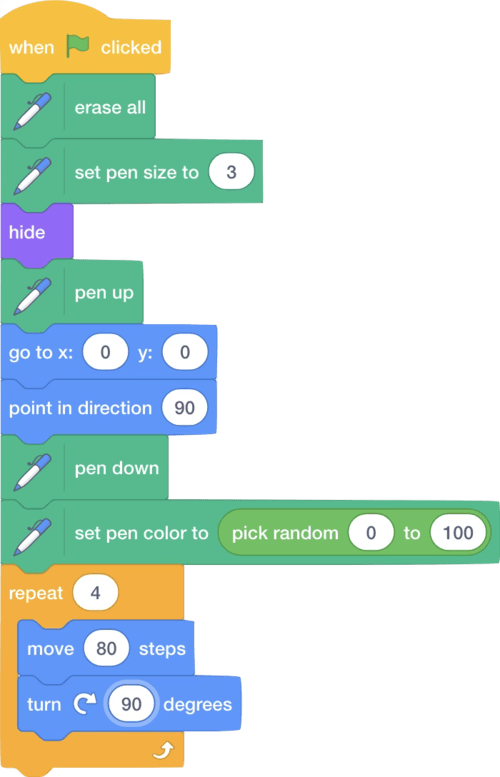
When you’re ready, create a new Scratch project, and construct the following program. Or, you can download the starter program here.
Note: There are two different “set pen color to” blocks: you want to use the second one that takes numbers for input. Before executing this project, try and predict what will happen.
Now consider a program that produces an output like this:

If you look carefully at this figure, the simple square shape that the original program would draw just once is now being drawn six times (each one rotated a bit more than the previous one), so we get a circular overall shape. Making this modification will consist of adding a repeat loop which will enclose the existing repeat loop (in other words, you’ll end up with a repeat loop inside of another one). In addition, you will need to add a “turn” command.
For this problem, modify the starter program to output a drawing like below, drawing precisely 36 squares.
Hint: the number of repetitions multiplied by the number of degrees the sprite turns before the next repetition should equal 360 in order to accomplish the overall circular shape.

How to Submit
- On Scratch, select File > Save now. Then select File > Save to your computer and keep that file so that you can submit it. If prompted by your computer to Open or Save the file, be sure to Save it.
- Rename your file to rotatingSquares.sb3.
- Go to CS50’s Gradescope page.
- Click “Problem Set 0: Rotating Squares”.
- Drag and drop your
.sb3file to the area that says “Drag & Drop”. - Click “Upload”.
You should see a message that says “Problem Set 0: Rotating Squares submitted successfully!” You may not see a score just yet, but if you see the message then we’ve received your submission!