OECD
Problem to Solve
Does higher spending on health care buy the citizens of a country a longer life? Are richer countries healthier? Do bigger countries have more people? Questions like these are about the relationship between two variables, and one of the most common tools for studying such relationships is linear regression.
In a file called oecd.py in a folder called oecd, implement a program that uses linear regression to measure, and plot, the relationships between several pairs of variables.
Distribution Code
For this problem, you’ll extend the functionality of code provided to you by CS50’s staff.
Download the distribution code
Log into cs50.dev, click on your terminal window, and execute cd by itself. You should find that your terminal window’s prompt resembles the below:
$
Next execute
wget https://cdn.cs50.net/2026/fall/psets/6/oecd.zip
in order to download a ZIP called oecd.zip into your codespace.
Then execute
unzip oecd.zip
to create a folder called oecd. You no longer need the ZIP file, so you can execute
rm oecd.zip
and respond with “y” followed by Enter at the prompt to remove the ZIP file you downloaded.
Now type
cd oecd
followed by Enter to move yourself into (i.e., open) that directory. Your prompt should now resemble the below.
oecd/ $
Execute ls by itself, and you should see a few files:
oecd.csv oecd.py worldarea.txt worldpop.txt
If you run into any trouble, follow these same steps again and see if you can determine where you went wrong!
Background
When you have two (or more) continuous variables, you can use linear regression to test whether there is a linear dependence between them. The goal of the regression algorithm is to find the best-fit straight line (or curve) through the data. The data itself consists of one or more independent variables, along with a dependent variable.
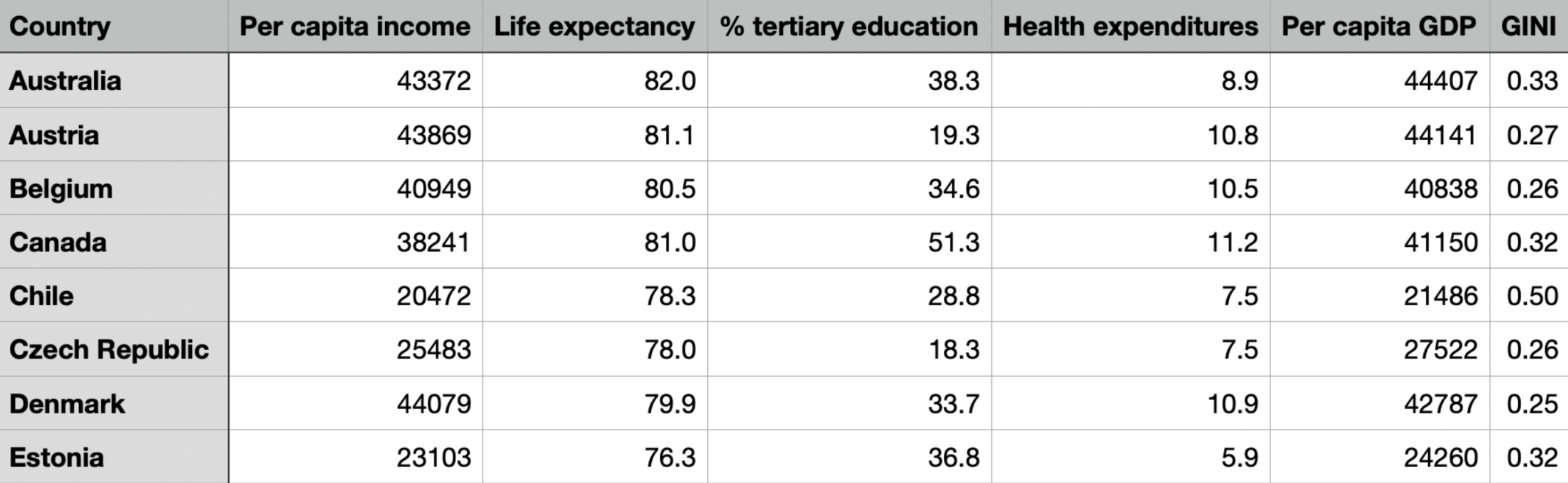
As a source of data, we extracted statistical indicators for various industrialized countries from the OECD Factbook and saved them in CSV format in a file named oecd.csv. Each row lists the values for a particular country. Here is what the first few rows look like after opening the CSV file in a spreadsheet application:
Reading the Data
Let’s study the relationship between health expenditures and life expectancy. Does higher spending buy the citizens of a country a longer life?
We can use a csv.DictReader to read the data, appending the values in the life expectancy and health expenditure columns to two lists:
lifeexp = []
healthex = []

reader = csv.DictReader(open("oecd.csv"))
for row in reader:
    lifeexp.append(float(row["Life expectancy"]))
    healthex.append(float(row["Health expenditures"]))
Correlation
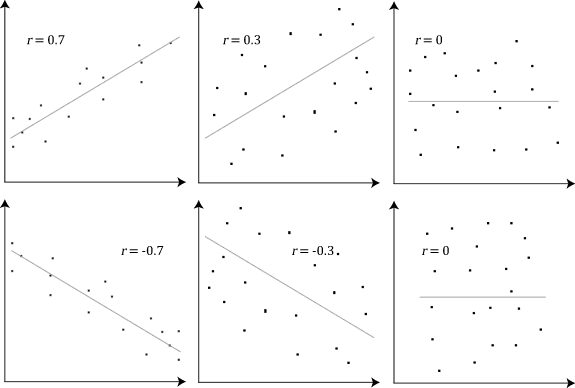
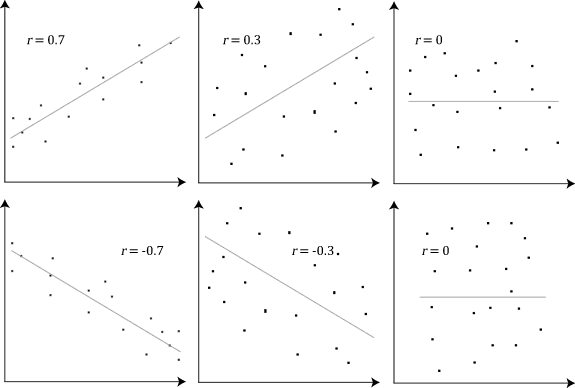
Next, we can compute the linear correlation coefficient, a value between -1 and 1 that signifies how closely the data follow a linear relationship. A correlation close to +1 or -1 indicates that the data points fall close to a line, and a correlation of exactly 1.00 or -1.00 would mean that all of the data points lie on a single straight line. A correlation of zero means that the points do not form a linear shape at all.
The examples below, from Wikipedia, show what data with various correlations look like.
Computing the Regression
The function scipy.stats.linregress computes the correlation coefficient as well as the slope and y-intercept of the regression line, the line that best fits through the data points. Its result is a tuple whose first three elements are the slope, the intercept, and the correlation:
r = scipy.stats.linregress(healthex, lifeexp)
slope = r[0]
intercept = r[1]
correlation = r[2]
In our case, the correlation is 0.358864, which is quite weak.
Plotting
Let’s plot the data points and the regression line. To draw a line, we need only its two endpoints, so we compute where the line sits at the smallest and largest x-values:
matplotlib.pyplot.scatter(healthex, lifeexp)

x1 = min(healthex)
y1 = intercept + slope * x1
x2 = max(healthex)
y2 = intercept + slope * x2

matplotlib.pyplot.plot([x1, x2], [y1, y2])
matplotlib.pyplot.savefig("graph.png")

It seems that there is one outlier: a country that spends far more than all the others on health care without getting a commensurate return in longevity. That country is the United States. Removing that outlying data point will yield a much better correlation.
Specification
Modify oecd.py so that it does each of the following. Each part should produce its own plot, saved as a separate PNG file in the oecd folder.
-
Health expenditures without the outlier. Remove the data point for the United States, then compute the correlation between health expenditures and life expectancy. Plot the data points and the regression line, show the correlation on the plot, and save the plot as
health.png. -
Income and life expectancy. Using the OECD data set, again leaving out the United States, determine the correlation between per capita income and life expectancy. Plot the data points and the regression line, show the correlation on the plot, and save the plot as
income.png. -
Country size and population. Recall the two country data files,
worldpop.txtandworldarea.txt. Both files contain the same countries in the same order. Determine the correlation between country size (area) and population. Plot the data points and the regression line, show the correlation on the plot, and save the plot asarea.png.
Hints
- It’s probably easiest to display the correlation in the title of each plot. See
matplotlib.pyplot.title. - Matplotlib draws every plot onto the same figure until you tell it otherwise, so your second plot could end up on top of your first! Consider calling
matplotlib.pyplot.clf(or creating a new figure) before you start each new plot. - Not sure what a column is called? Recall that
reader.fieldnamesgives you alistof the CSV’s column names. - To leave out the United States, you’ll need to know which row it’s in. Take a look at which column holds each country’s name, and skip that row as you read the data.
- Open
worldpop.txtandworldarea.txtto see how they’re formatted before you write code to read them. You may need to split each line apart and convert part of it to a number. - Since you’ll be doing the same steps (compute a regression, plot points, plot a line, add a title, save) three times, consider writing a helper function that takes two lists and a filename as arguments.
How to Test
Run your program as python oecd.py, then open each image it creates by double-clicking it in your codespace’s file browser.
- Confirm that
health.pngshows the health expenditure data without the United States, with a regression line and a correlation stronger than0.358864in its title. - Confirm that
income.pngshows per capita income on one axis and life expectancy on the other, without the United States, with a regression line and the correlation in its title. - Confirm that
area.pngshows country area on one axis and population on the other, with a regression line and the correlation in its title. - Confirm that each plot contains only its own data, not leftover points or lines from an earlier plot.
Correctness
check50 cs50/problems/2026/fall/oecd
Style
style50 oecd.py
How to Submit
After you submit, wait a few minutes and then be sure to check your autograder results. If you see SUBMISSION ERROR: missing files (0.0/1.0), MissingFilesError, or the like, it means your files were not named exactly as prescribed (or you uploaded them to the wrong problem). Correctness in submissions entails everything from reading the specification, writing code that is compliant with it, and submitting files with the correct name. If you see this error, you should resubmit right away, making sure your submission is fully compliant with the specification. The staff will not adjust your filenames for you after the fact!
- Download your
oecd.pyfile by control-clicking or right-clicking on the file in your codespace’s file browser and choosing Download. - Go to CS50’s Gradescope page.
- Click Problem Set 6: OECD.
- Drag and drop your
oecd.pyfile to the area that says Drag & Drop. Be sure it has that exact filename! If you upload a file with a different name, the autograder likely will fail when trying to run it. Ensuring you have uploaded a file with the correct filename is your responsibility! - Click Upload.
You should see a message that says “Problem Set 6: OECD submitted successfully!”