Lecture 8
- Welcome!
- Authentication and Authorization
- Passwords
- Brute Force Attacks
- Rate Limiting
- Password Managers
- Two-Factor Authentication
- Hashing
- Rainbow Tables
- Salting
- Cryptography
- Secret Key Cryptography
- Public Key Cryptography
- Pass Keys
- End-to-End Encryption
- Secure Deletion
- Full Disk Encryption
- Ransomware
- Summing Up
Welcome!
- In our previous sessions, we explored databases, SQL, and how data is organized and queried in modern systems.
- This week is all about securing systems. What do we mean by security or cyber security in particular? Generally, it refers to keeping our systems safe from harm, from theft, from intrusion.
- We will explore a couple of primitives via which we can begin to secure our systems: authentication and authorization.
- By the end of today’s lecture, you will understand the fundamentals of passwords, encryption, and best practices for keeping systems and data secure.
Authentication and Authorization
- The first primitive we might call authentication, the process of proving who you are, as by logging in with a username and password.
- But authentication alone is not necessarily sufficient for keeping a system secure. Just because you can demonstrate who you are and have an account on a system doesn’t mean you should be able to do anything and everything on that system.
- For instance, deleting files or accessing data that maybe you’re not authorized to access.
- Another primitive to consider is authorization, some form of access control that specifies once you have authenticated and proved who you are, what resources should you and should you not actually have access to.
Passwords
- In the real world, you and I are authenticating all of the time. And how are we doing this? Generally by way of using passwords.
- Odds are you have tens of, hundreds of passwords nowadays, not to mention usernames. But it turns out we humans are not very good at even choosing good passwords.
- It’s commonly the case that passwords are discovered by hackers getting into databases or somehow finding access to usernames and passwords. Those passwords then leak out onto the public Internet.
- Fortunately, there are security researchers out there, the good guys, who can mine that data for lessons learned. Among the lessons we can learn is just how common certain passwords actually are.
- Over recent years, such passwords as these have been discovered to be among the most common, which is not a good thing:
-
123456suggests the system requires passwords of at least length six. -
123456789is marginally more secure, suggesting a larger length requirement of nine. -
passwordis literally just an English word, probably not hard to guess. -
password1suggests a bit more complexity with a number thrown in. -
qwertyis the top row of keys on a US English keyboard. -
qwerty123suggests systems requiring alternation between letters and numbers. -
111111is not compelling, though123123has less repetition but still a pattern. -
iloveyouis both adorable and insecure, even though it’s three words. -
P@ssw0rdwith substitutions (@ for A, 0 for O) might seem clever, but adversaries know that people use these heuristics, so it’s among the first things they try.
-
- The lesson learned is that you do not want to be on this list. Any smart adversary trying to get into a system will download the top 10, top 100, top 1,000 list and start with those passwords, because probabilistically, those passwords will get them in sooner.
- There’s far too much predictability in all of these. Numbers are not hard to generate. English words can be found in dictionaries. Any smart adversary will try a dictionary attack, downloading a big dictionary and trying all possible passwords, eventually concatenating two, then three English words together.
Brute Force Attacks
- As the name conjures up from yesteryear, the idea of using a big battering ram to try to brute force your way through a castle door, just trying really hard, not doing anything particularly sophisticated, but trying again and again until you can enter that system.
- A brute force attack digitally nowadays refers to using software or hardware to automate the process. Even if you don’t know what the password might be, you could try all possibilities.
- Let’s consider how secure a system would be if protected by only a four-digit passcode. This is common on cell phones.
- If you are required to have a four-digit passcode that is entirely numeric (zero through nine), there are 10 possibilities for the first digit, times 10 for the second, times 10 for the third, times 10 for the fourth, which gives you 10,000 possibilities.
- An adversary, in order to brute force their way into a phone protected by a four-digit passcode, is going to have to try as many as 10,000 possibilities. On average, maybe 5,000. They could get lucky if your passcode is 0000.
-
For a human adversary, that might be tedious. But with software, like Python, it’s not hard to write a loop that just tries all possibilities. Consider the following code:
# Brute force attack on 4-digit passcodes

from string import digits
from itertools import product

for passcode in product(digits, repeat=4):
    print(passcode)
Notice how this code iterates through all 10,000 possible four-digit combinations. Running this takes about a second.
- What if we try four-letter passcodes instead? There are 26 letters in the English alphabet, but if we allow uppercase and lowercase, we can double that to 52. So 52 to the fourth power gives us 7,311,616 possibilities.
-
We can modify the code to use ASCII letters instead of digits:
# Brute force attack on 4-letter passcodes

from string import ascii_letters
from itertools import product

for passcode in product(ascii_letters, repeat=4):
    print(passcode)
Notice how this takes a couple of minutes to go through all seven million possibilities.
- A system protected by a four-letter passcode is arguably more secure than a four-digit passcode. We have raised the bar to the adversary. This now takes them more time, and with more time might come more risk.
- Security is not in absolute terms but in relative terms. The attack is still the same, but we’ve raised the bar in the sense that it takes more time and potentially more resources.
- What if we use four characters, not just letters or numbers, but punctuation too? There are 94 possibilities (52 letters, 10 digits, 32 punctuation symbols). So 94 to the fourth power gives us 78,074,896 possibilities.
- What about eight-character passcodes? That’s 94 to the eighth power, which is six quadrillion possibilities. At one passcode per second, you would spend 193 million years brute forcing your way in.
- This is why websites and applications are making you come up with long, seemingly random passwords. You want to be in that sweet spot of quadrillions of possibilities so the odds of an adversary reaching you are quite small.
Rate Limiting
- The trade-off with longer, more complicated passwords is that it gets harder for you and me to remember them. Then we resort to reusing the same password or using similar passwords for different systems, making ourselves more vulnerable.
- If the attack is so simple, just four lines of Python code, how can we defend? We can make passcode requirements longer and more complicated, but that shifts the onus onto you and me to remember them.
- What if we have other defenses in place, like rate limiting? What if we only let the adversary try one password per second? That’s going to take them quite a few million years.
- Alternatively, if someone is trying a million-plus passwords, odds are they are not you. This is an adversary. Even if you’ve forgotten your password, you’re not going to try millions of times, probably not thousands, probably not even hundreds. Maybe 10 times, maybe 12.
- With rate limiting, if the user fails to input the correct passcode after 10 attempts, we can lock the phone. Give an explanatory message: “Please try again later.” Come back in one minute.
- After another 10 failed attempts, pump the brakes more: Come back in five minutes, 10 minutes, an hour. Among the funnier posts online is someone whose phone said “please try again in 16 years.”
- With rate limiting, we don’t fundamentally change the threat, but we raise the bar so much higher that the adversary is just not going to stick around.
- It’s often said by locksmiths that you don’t need to be the most secure house on the block. You just need to be more secure than your neighbor. The adversary turns their attention to a lower barrier to entry.
Password Managers
- If you have all these passwords of varying complexity, how do you keep track of them? You shouldn’t reuse them or use similar ones. In an ideal world, you would have a very long, unique, seemingly random password for every application and website.
- Behaviorally, you and I might resort to unwise behaviors: Writing passwords on a Post-it note on the monitor or a printout in the drawer. That might help you but really decreases the barrier to an adversary who walks past.
- Better nowadays is to use password managers, software that allows you to generate good passwords (long, seemingly random), save those passwords securely, and typically protect everything with one main account password.
- The proposition is: Stop memorizing all these other accounts. Just remember this one account password for your password manager. When you use it to log in, you have access to all of your other usernames and passwords.
- There is a heightened risk: You’re putting all your eggs in one basket. If your password manager’s password is compromised, all your accounts are compromised.
- But if in practice you’re using Post-it notes or cheat sheets or reusing bad passwords anyway, it’s still a net positive because your overall practice would be more secure than your prior practices.
Two-Factor Authentication
- Increasingly, you’re being required to use two-factor authentication, which requires two factors to prove who you are. These factors are fundamentally different.
- It would not suffice to have just two passwords. Rather, two fundamentally different types of factors.
- One factor is something you typically know, a password. The other factor is something you typically have, like a phone in your pocket or a key fob on your key chain.
- You receive a unique code, usually six digits, that you type in along with your password. The code constantly changes every minute or so but stays in sync with the server.
- The implication is that even if someone figures out your password or a database is hacked, the adversary needs that second factor. They need something physically on you, which narrows the threat from anyone on the internet to just people in the same room or building, a far lesser threat.
- The downside is added friction: A second step, taking out your phone, finding the key fob. What if you don’t have signal, your battery died, or the phone is in the other room?
- Alternatively, your second factor could be something you are: Biometrics like fingerprints, face, or eyes.
Hashing
- When you visit a website and forget your password, there’s usually a link to reset it. In the worst possible situation, the website just emails you your password.
- That’s the worst scenario because if they can email your password, they know what it is. And your password is probably the same or similar to passwords you use elsewhere. No good comes from the website storing your password in a way they can see it.
- What are the best practices for storing passwords server-side? We revisit the notion of hashing.
- When we hash a value, we take a seemingly infinite domain of inputs (strings) and map them to a finite range of values. In the context of passwords, the output is a string value that seems nonsensical but is unique.
- For many years, it was common that somewhere on a server was a simple text file containing usernames and passwords. Ideally, those passwords were not in clear text but hashed.
-
You wouldn’t see that Alice’s password is “apple.” Instead, you’d see something seemingly nonsensical. The hash function is the algorithm that turns the input into the output.
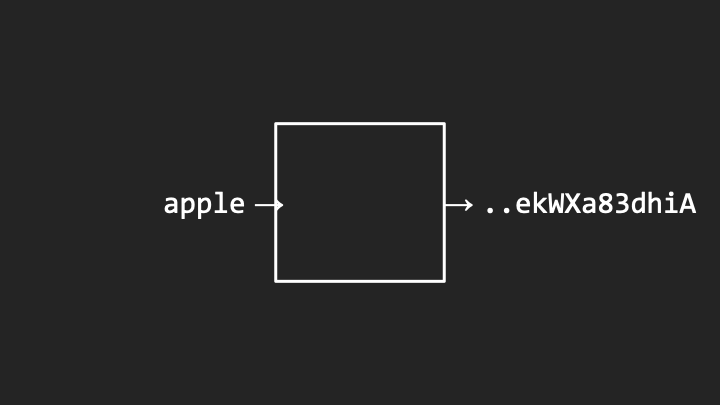
Notice how the password “apple” becomes a cryptic hash value.
-
Different passwords produce completely different hash values:
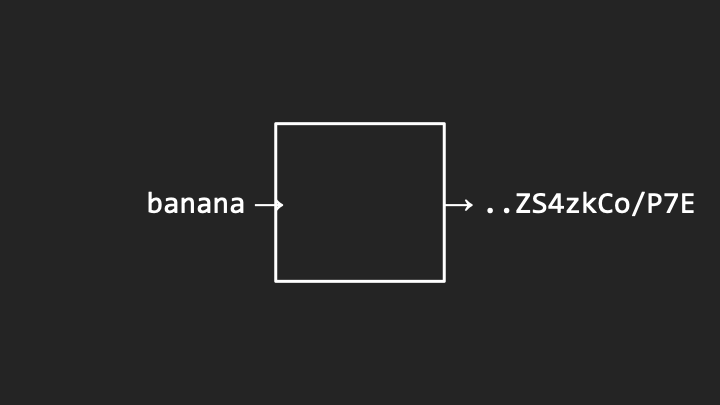
Notice how “banana” produces an entirely different output.
- The hash functions should be one way. You can run the same input through the hash function again and again and always get the same output deterministically. But it should not be possible to send the hash value back and get out the original password.
- In practice, hash values are even much longer than these examples. Alice and Bob might have hash values that look quite complex. I challenge you to figure out that one came from “apple” and the other from “banana.”
Rainbow Tables
- Even if hash functions are one way and you can’t reverse them, you could calculate the hash values of all English words in advance. Go through a dictionary using a for loop, figure out the hash value for “apple,” “banana,” “cherry,” and keep them around.
- Store them in a spreadsheet or database such that you’ve pre-computed all those hash values. This is known as a rainbow table.
- Thereafter, when you encounter a system where you’ve accessed the password file containing hash values, you can look up the hash value, see if you’ve computed it before, and find what word from the dictionary produced that value.
- Given the hash value alone, you cannot reverse the process. But by hashing all possible dictionary words and combinations, you create a cheat sheet.
- This might not be sufficient unless the hash values are so long and passwords so complicated that it’s not worth the adversary’s time to pre-compute millions, billions, or quadrillions of possibilities.
Salting
- Consider another concern. If Alice’s password is “apple,” Bob’s is “banana,” Carol’s is “cherry,” and Charlie’s password is also “cherry,” what happens?
- When you look through the list, you can infer that Carol and Charlie have identical hash values. This leaks information. If they have something in common, maybe they use the same word. The adversary can focus their attack there.
- By transitivity, if Carol’s password is discovered, the adversary immediately knows Charlie’s password too.
-
How can we mitigate this? If the same password yields the same hash value, that leaks information. What if we sprinkle a little bit of salt in there?
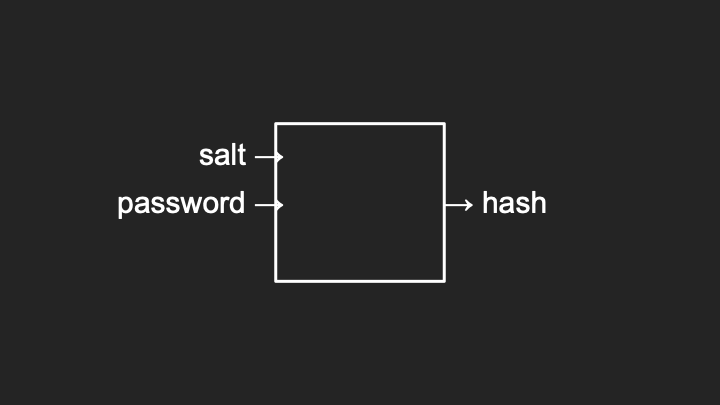
Notice how both the salt and password go into the hash function.
- Instead of passing just the password as input, we also pass in some other value, usually a couple of additional characters like “AA” or “50.” We choose that in advance and add it to the algorithm.
-
If we pass in “cherry” with a salt value of “50,” the hash value is perturbed:
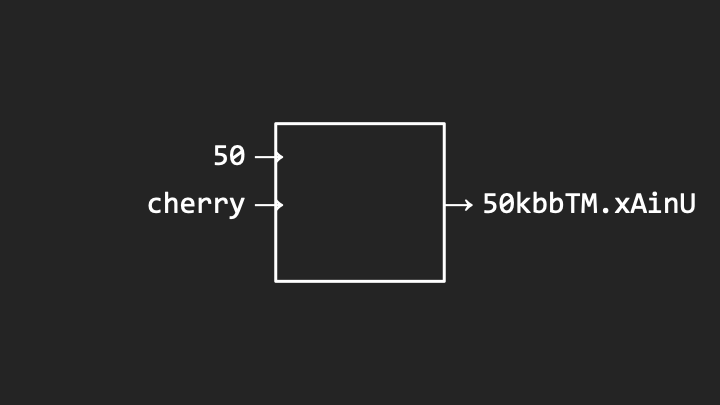
Notice how the salt “50” is captured in the hash value and the rest of the hash is completely different.
- If for Charlie we use a different salt value, like “49,” the resulting hash value will be completely different, not just the salt changing but the entire hash.
- So long as we have sufficiently many salts available, we can allow users to have the same password, and so long as we use different salts for each user, the resulting hash value looks entirely different.
- When checking passwords, the server tries to add those salt values to your password, runs it through the hash function, and compares the resulting hash values, including the salt, against the database.
Cryptography
- Whereas hash functions are one way by design, related in spirit but even more powerful is the art and science of cryptography, which allows you to scramble information in such a way that you can also reverse that process.
- You can not only encrypt information from plain text into what we call cipher text, you can also decrypt that information from cipher text back into plain text.
- This is useful for secure communications between two parties.
Secret Key Cryptography
- Suppose you want to send a message to someone else but want to use an insecure medium: Postal service, the Internet where someone might be eavesdropping.
- How can you ensure the recipient can receive and read the message, but no one else in between?
-
You can take your original message (plain text) and choose in advance a secret key, typically a number. You pass that into a function known as a cipher. The output is cipher text, seemingly random but reversible with that same secret key.
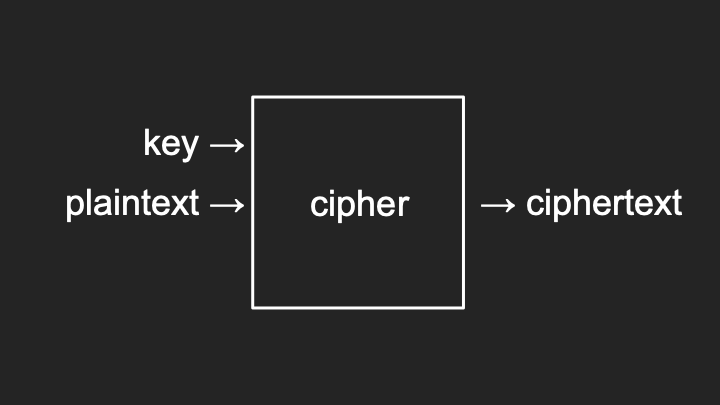
Notice how the key and plaintext combine to produce encrypted ciphertext.
-
To decrypt, you pass in the cipher text and that same key into the cipher and get back the plain text:
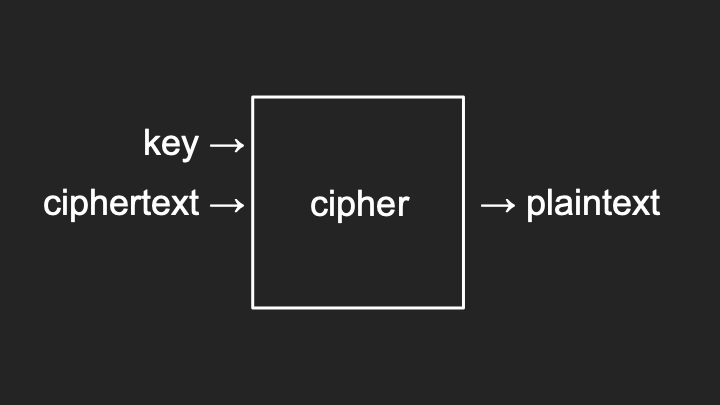
Notice how the same key reverses the process.
- This is generally known as secret key cryptography or symmetric cryptography, because you’re using the same key in both directions.
- For example, if you encrypt the letter “A” with a key of 1, a cipher might simply rotate the letters of the alphabet by that many places. So “A” becomes “B,” “B” becomes “C,” and “Z” wraps around to “A.” This is a Caesar cipher.
- The upside is simplicity. So long as you and the receiver both know the secret key, you can do this all day long.
- The problem: How does the recipient know what key to use? You have to agree in advance. But how do you agree securely? If you email or text it, that’s not encrypted, so you’re telling the whole world.
- There’s a chicken and egg problem. To use symmetric cryptography, you need to establish a key in advance, but you can only do so if you already have a secure channel, like meeting in person.
Public Key Cryptography
- Asymmetric cryptography, otherwise known as public key cryptography, offers a solution.
- If you want to exchange a message with someone like Amazon.com, with whom you have not established a prior secret, you can generate a public key and private key pair using a well-documented algorithm like RSA.
- These are two really big numbers with an inherent mathematical relationship. One encrypts and the other decrypts.
- To send a message to Amazon, you download their public key, which by definition is public. You use that public key to encrypt your plain text.
- Amazon should be the only one who can decrypt that message because they are the only ones with the corresponding private key.
- Amazon passes in their private key and the cipher text to get back the plain text.
- This is the S in HTTPS. It’s the combination of algorithms like these that enable secure communications.
- In practice, public key cryptography tends to be slower mathematically. So it’s often used to exchange a shared secret, and then symmetric cryptography is used for the actual messages.
Pass Keys
- We can use public key cryptography to address the password problem. Pass keys are an alternative some websites now support.
- With pass keys, you don’t have to generate and store a password. Your device generates a public and private key pair when you register for a website.
-
You send the public key to the server. The server sends you a challenge, like a big random number. You use your private key to encrypt (digitally sign) the challenge and send the signature back.
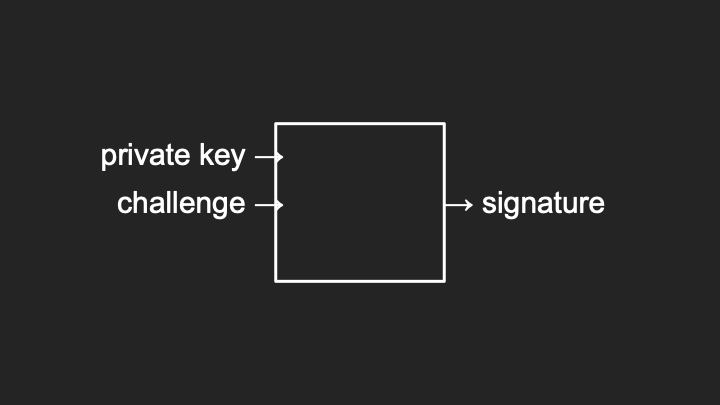
Notice how the private key signs the challenge to create a signature.
-
The server uses your public key to decrypt the signature, which should produce the original challenge:
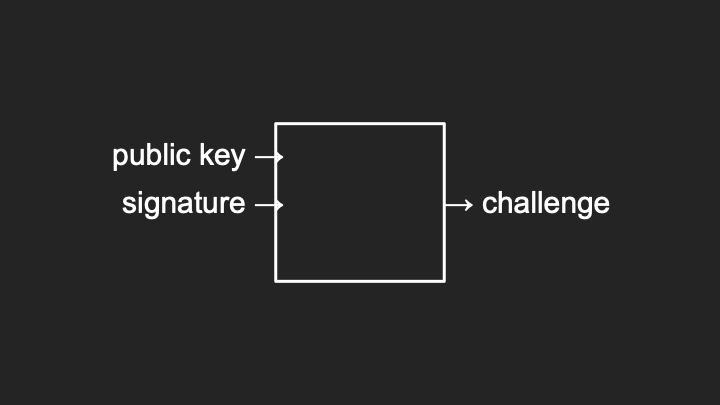
Notice how the public key verifies the signature.
- Thanks to the mathematics of public key cryptography, the public and private key have an inherent relationship ensuring probabilistically that only those two values can perform these operations.
- Subsequently, each time you visit the website, your device can wait for a challenge, sign it with your private key, and the server verifies with your public key. You are now passwordless.
- If you see a passwordless option, it’s probably using public key cryptography to take you and me out of the loop, allowing the computers to communicate on our behalf.
End-to-End Encryption
- Increasingly, services offer end-to-end encryption. In the world of HTTPS, you have an encrypted connection between you and the server. Other users have encrypted connections too.
- If the server is Gmail, you can send an email securely to Gmail, and the recipient logs in with a secure connection. But the machine in the middle, Gmail itself, theoretically has access to that email.
- You have security but not necessarily privacy. The email is not secure between you and the final recipient; it’s sitting on a server.
- With end-to-end encryption, services like WhatsApp, iMessage, and Signal guarantee that even if your data travels through third-party servers, only the final recipient can decrypt it.
- Your device encrypts the message such that only the recipient’s device can decrypt it. The machine in the middle sees only cipher text, random zeros and ones, because they don’t have access to the keys.
Secure Deletion
- Let’s consider the security of our actual data. It’s common to want to delete files. Unfortunately, historically, deleting a file has not been a secure operation.
- When a computer deletes a file, it effectively just forgets where it is. It loses track of what file name refers to what zeros and ones. The actual data, the patterns of zeros and ones, are still there.
-
Consider this pattern of zeros and ones representing a file on your system:
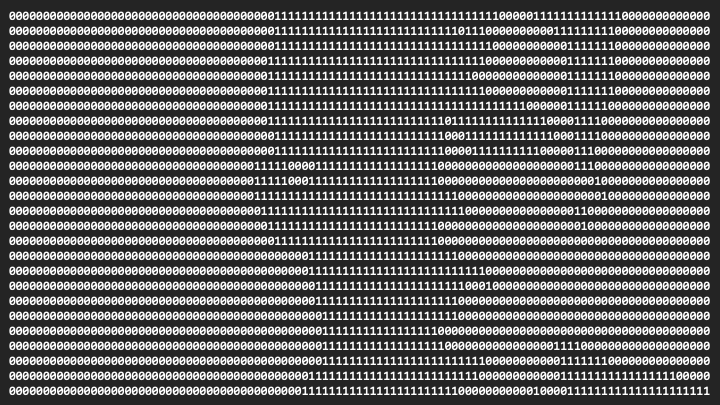
Notice the mix of zeros and ones representing actual data content.
-
When you delete a file, the computer marks those bits for reuse by other files. The next file you download might only use a subset of those bits:

Notice how the data still remains on disk. Standard deletion only removes the file system reference but leaves the actual data intact and potentially recoverable.
- If a researcher or law enforcement gains access to this device, they could reconstruct part of the file. Deleting a file doesn’t mean the data is gone forever. It’s just forgotten but often recoverable.
-
Secure deletion means doing more work to ensure those zeros and ones cannot be recovered:

Notice how the original data has been overwritten with zeros, making recovery much harder.
- You should change all those bits to zero or completely randomize them. Now you’ve securely deleted the file because you have no idea which zeros were originally ones.
Full Disk Encryption
- Secure deletion isn’t always efficient, especially with today’s solid-state drives that have finite life. The more you write to them, the more wear and tear.
- Increasingly common is full disk encryption, which encrypts your entire hard drive. All data on your computer, while logged out or powered off, is completely encrypted.
-
Instead of zeros and ones looking structured, they look completely random:
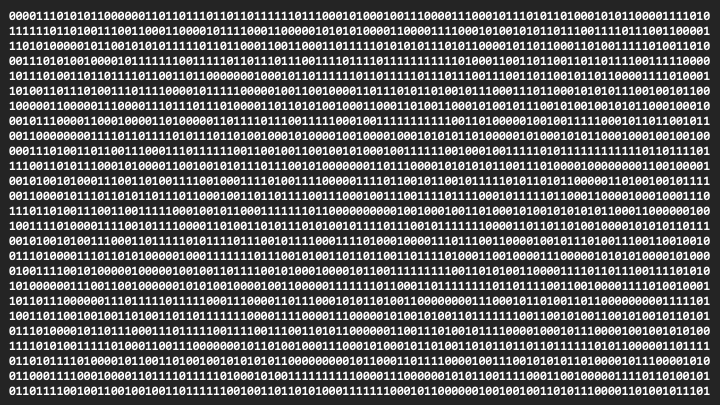
Notice how encrypted data appears as a seemingly random pattern, unintelligible without the decryption key.
- Only once you log in with your password does the computer decrypt those patterns into useful files.
- If your device is stolen and not powered up and logged in, the adversary only sees random zeros and ones unless they figure out your password.
- You’ve effectively securely deleted all your files just by not telling the adversary your password.
- The flip side: If you have a hard password but forget it, you’ve also effectively wiped your hard drive.
- When you wipe an iPhone or Android device for trade-in or sale, if you’re using a password, it typically sanitizes the secret key used to encrypt the information, rather than slowly changing all zeros and ones.
Ransomware
- These same features can be used for evil. Ransomware is an application of these ideas for ill purposes.
- If an adversary breaks into your system, they can use encryption to scramble all your important files and not tell you the secret key unless you pay a ransom.
- This has happened all too often: Companies, hospitals, systems infiltrated. The systems are left online, but the data is encrypted unless someone pays using cash or Bitcoin.
- How do you defend? Adhering to best practices and having backups of all your important data, off-site backups that aren’t networked, so when adversaries encrypt things maliciously, you don’t back up the encrypted versions.
Summing Up
In this lesson, you learned about securing systems. Specifically, you learned…
- About authentication (proving who you are) and authorization (what resources you can access).
- Why common passwords like “123456” and “password” are insecure and easily guessed.
- How brute force attacks work and how the number of possible passwords affects security.
- About rate limiting as a defense that slows down attackers after failed attempts.
- How password managers help you generate and store unique, complex passwords securely.
- About two-factor authentication and how it combines something you know with something you have.
- How hashing transforms passwords into seemingly random values that cannot be reversed.
- About rainbow tables and how pre-computed hash values can be used to crack passwords.
- How salting adds random data to passwords before hashing to prevent rainbow table attacks.
- About secret key (symmetric) cryptography where the same key encrypts and decrypts.
- About public key (asymmetric) cryptography where different keys encrypt and decrypt.
- How pass keys use public key cryptography to enable passwordless authentication.
- About end-to-end encryption and how it ensures only the final recipient can read your messages.
- Why standard deletion doesn’t remove data and how secure deletion overwrites the original bits.
- How full disk encryption protects your data by making it appear random without the correct password.
- About ransomware and the importance of maintaining off-site backups.
This was CS50’s Computer Science for Business.