Lecture 7
- Welcome!
- Databases
- Flat-File Databases
- Relational Databases
- SQL
- SQLite
- SELECT
- DELETE
- INSERT
- UPDATE
- IMDb
- Primary Keys and Foreign Keys
- One-to-One Relationships
- Joins
- One-to-Many Relationships
- Nested Queries
- Many-to-Many Relationships
- Indexes
- NoSQL
- Race Conditions
- SQL Injection Attacks
- Summing Up
Welcome!
- In our previous sessions, we learned about the Internet and the web, exploring how data travels between computers and how web pages are built.
- Today is all about deploying databases, particularly when we have lots and lots of data that we want to store at scale.
- What do we mean by data? Really just information, and that information can be textual in nature or perhaps binary in nature, that is to say files and such.
- At the end of the day, we want to store all of this data in a so-called database, which is a collection of data in a computer system.
- Databases specifically tend to be actual products that you can download and install on a computer, for instance, Oracle and SQL Server, MySQL, and Postgres.
Databases
- There are different terms you might encounter in this world of data more broadly.
- A data warehouse is really a database of databases, all of your data somehow combined in one place.
- A data mart is actually just a subset thereof. This might just be your marketing database, financial database, or something else more narrowly defined.
- A data lake is a hot mess of data whereby you might just dump all of your data in PDFs and files and CSV files and more, generally with the intent of coming back to it later. But it’s not necessarily as organized as other formats might take.
- Today we’ll focus indeed on databases, which are organized collections of data, and those collections themselves can take different forms.
Flat-File Databases
- Perhaps the simplest way of storing a lot of data is inside of a so-called flat-file database, which literally means just storing your data in a file, maybe a text file, maybe a binary file.
- That file might be structured. A very common format for flat-file databases are CSV files for comma-separated values, whereby all of the textual data in your file is somehow organized effectively into rows and columns.
- The rows are straightforward to implement in a CSV file because you just put one line of data per row, hitting Enter at the end of each of those lines.
- Within each of those lines or rows, you can indicate the presence of a column, or more specifically an individual cell, by separating the data on that line with commas.
- Alternatives include TSV files (tab-separated values) or using vertical bars to delineate data. The choice of character is up to you, but it does influence exactly what type of software or how the software reads that file.
-
Consider the following example of a phonebook stored in a CSV file:
name,number
Brian,+1-617-495-1000
David,+1-617-495-1000
Doug,+1-617-495-1000
Eric,+1-617-495-1000
John,+1-949-468-2750
Notice that the first line is the header row, indicating that this file has two columns: name and number. The comma indicates where one column ends and another begins.
- If any of your data in a CSV file actually needed to contain actual commas grammatically, you can put all of the data in one cell in double quotes. It just requires that whatever software you’re using knows to treat those quotes appropriately.
- The limitation of a flat-file database is that we would essentially have to read the entire file searching for a specific name. Moreover, making changes, additions, or deletions is a fairly manual process. There’s no inherent functionality offered to us.
Relational Databases
- To get more user-friendly functionality, we can transition from a flat-file database to a relational database.
- A relational database generally refers to software that not only stores your data for you, but also provides you with some core functionality. Moreover, that software allows you to relate data within your set of data to each other in different ways.
- Consider a simple example with schools and cities. Harvard and MIT are both in Cambridge, while Oxford is in Oxford. Now suppose we add the University of Cambridge, also in Cambridge (but in the UK).
- We have two problems: an inefficiency insofar as we’re storing “Cambridge” multiple times, and a problem of disambiguation since Cambridge, UK is different from Cambridge, Massachusetts, USA.
- Let me propose that we explode this single table of data into two tables: one for the schools, one for the cities. Then we assign a unique identifier to each city, for instance, a simple number starting with 1.
- Now in the schools table, instead of storing the city name, we store a city ID instead. Both Harvard and MIT would have city ID 1, Oxford would have city ID 2, and Cambridge University would have city ID 3, disambiguating between the two Cambridges.
- This is how relational tables work inside of a relational database. It’s a collection of data, and it’s relational insofar as we use unique identifiers to relate some data to other data.
SQL
- SQL, or Structured Query Language, is typically the language used with relational databases via which to query data and also update your data and delete data and insert more data.
- SQL allows you with code to automate the process of reading and writing data.
- There’s an acronym that might help you remember the four basic operations: CRUD.
- C stands for Create, R stands for Read, U stands for Update, and D stands for Delete.
- In SQL, reading data uses a command called
SELECT.CREATE,UPDATE, andDELETEare also used.INSERTexists when we want to insert new data, andDROPcan delete an entire table. - SQL is a declarative language where it’s closer to using English to just declare what question you have without worrying as much about how to get from that question to the answer.
- You needn’t worry so much about loops, variables, or conditions. You can instead say, closer to English, exactly what data you would like to select, update, delete, or insert.
SQLite
- We’re going to use a fairly simple version of SQL called SQLite. The command we’ll use to interact with this lightweight version of SQL is
sqlite3. - SQLite is not a toy version of SQL. It’s very commonly used in web browsers and mobile applications, but it doesn’t have as many features as commercial tools suited for the largest sets of data.
- To create a database, type
sqlite3 phonebook.dbin the terminal. This creates an empty database file. -
To import data from a CSV file, you can use these SQLite-specific commands:
.mode csv
.import phonebook.csv phonebook
.quit
Notice that these dot commands are specific to SQLite. The
.mode csvputs SQLite into CSV mode, and.importloads the CSV file into a table called phonebook. -
To see the schema of your database, use
.schema:CREATE TABLE IF NOT EXISTS phonebook(name TEXT, number TEXT);Notice that this shows the structure of the table with two columns: name and number, both of type TEXT.
SELECT
- You can read items from a table using the syntax
SELECT columns FROM table. - For example,
SELECT * FROM phonebook;will print every row in the phonebook table. The*is a wildcard meaning “all columns.” -
You can get a subset of the data:
SELECT name FROM phonebook;
SELECT number FROM phonebook;
Notice that you can specify exactly which columns you want to see.
-
SQL supports many functions to access data:
AVG COUNT DISTINCT LOWER MAX MIN UPPER - For example,
SELECT COUNT(*) FROM phonebook;returns the count of rows.SELECT DISTINCT number FROM phonebook;returns only unique numbers. You can combine these:SELECT COUNT(DISTINCT number) FROM phonebook;returns a count of unique numbers. -
SQL offers additional keywords for queries:
WHERE       -- adding a Boolean expression to filter our data
LIKE        -- filtering responses more loosely
ORDER BY    -- ordering responses
LIMIT       -- limiting the number of responses
GROUP BY    -- grouping responses together
Notice that
--is how you write a comment in SQL. -
To find a specific person’s number:
SELECT number FROM phonebook WHERE name = 'John';Notice the use of single quotes for text values.
-
To find everyone with a specific number:
SELECT name FROM phonebook WHERE number = '+1-617-495-1000'; -
To group and count by number:
SELECT number, COUNT(*) FROM phonebook GROUP BY number;Notice how this groups all like numbers together and counts how many names share each number.
DELETE
-
The
DELETEcommand removes data from a table:DELETE FROM phonebook WHERE name = 'David';Notice the importance of the
WHEREclause. Without it,DELETE FROM phonebook;would delete everything in the table.
INSERT
-
The
INSERTcommand adds new rows:INSERT INTO phonebook (name) VALUES ('David'); INSERT INTO phonebook (name, number) VALUES ('David', '+1-617-495-1000');Notice that if you omit a column, its value becomes
NULL, a special sentinel value indicating the deliberate or accidental omission of data.
UPDATE
-
The
UPDATEcommand modifies existing data:UPDATE phonebook SET number = '+1-617-495-1000' WHERE name = 'David';Notice that without the
WHEREclause, this would update every row in the table. -
To order results alphabetically:
SELECT * FROM phonebook ORDER BY name;
SELECT * FROM phonebook ORDER BY name ASC;
SELECT * FROM phonebook ORDER BY name DESC;
Notice that
ASCis ascending (the default) andDESCis descending order.
IMDb
- Let’s transition from our tiny phonebook to an actual real-world database from IMDb, the Internet Movie Database, which has information on actors, TV shows, movies, and more.
- If you have thousands or millions of rows, you’ll want to store things as efficiently as possible.
- Consider storing TV show data. You could put the show name in one column and then star, star, star for each actor. But different shows have different numbers of stars, creating ragged data. In relational databases, if you’re in the habit of adding more and more columns, you’re probably doing something wrong.
- A better approach uses separate tables with unique identifiers. One table for shows (with ID, title, year, episodes), one for people (with ID, name, birth), and intermediate tables to create relationships.
-
Here is a diagram representing the IMDb database structure:
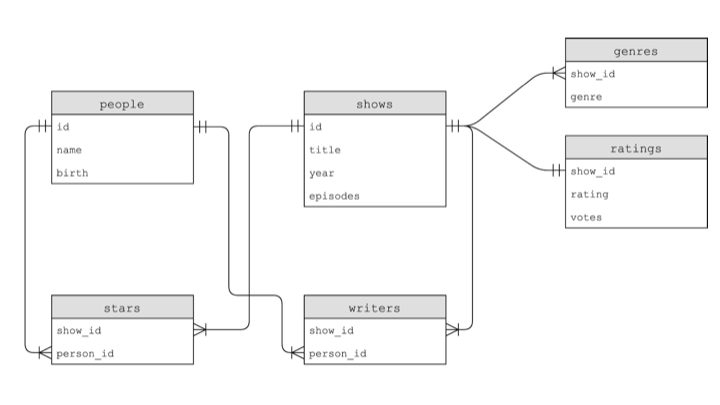
- You’ll see tables like shows, people, stars, writers, ratings, and genres. Lines between tables indicate relationships.
Primary Keys and Foreign Keys
- A primary key is a column in a table that uniquely identifies each of its rows, typically with a simple integer value like 1, 2, 3, or much larger.
- A foreign key is the presence of a primary key in another table. Foreign keys enable us to create relations across tables.
-
In SQLite, we have five primary data types:
BLOB -- binary large objects that are groups of ones and zeros INTEGER -- an integer NUMERIC -- for numbers formatted specially like dates REAL -- like a float TEXT -- for strings and the like - Columns can have constraints like
NOT NULL(the database won’t let you omit a value) andUNIQUE(the database won’t let you insert duplicate values).
One-to-One Relationships
-
Between shows and ratings, we have a one-to-one relationship. Every row in the shows table corresponds to one row in the ratings table.
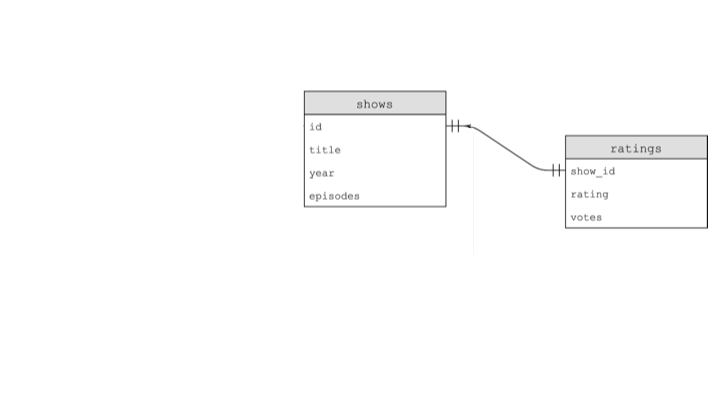
- The shows table’s ID column lines up with the ratings table’s show_id column as a foreign key.
-
To see this in action with the shows database:
SELECT * FROM shows LIMIT 10;
SELECT * FROM ratings LIMIT 10;
SELECT COUNT(*) FROM shows;
Notice the use of
LIMITto restrict output to the first 10 rows.
Joins
- A join allows you to take two tables and join them together so you have access to all the data you care about.
-
To join shows with ratings:
SELECT * FROM shows
    JOIN ratings ON shows.id = ratings.show_id
    WHERE shows.id = 386676;
Notice how we specify which columns to match on with
ON shows.id = ratings.show_id. -
To get just the title and rating:
SELECT title, rating FROM shows
    JOIN ratings ON shows.id = ratings.show_id
    WHERE shows.id = 386676;
Notice that this returns “The Office” with a rating of 9.0.
One-to-Many Relationships
-
Between shows and genres, we have a one-to-many relationship. One show can have many genres (comedy, drama, thriller, etc.).
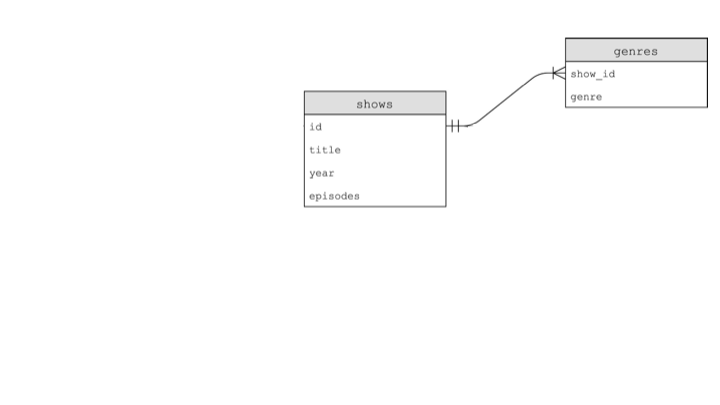
-
To find genres for a specific show:
SELECT genre FROM genres WHERE show_id = 63881;Notice this returns adventure, comedy, and family for Catweazle.
Nested Queries
-
You can nest SQL commands together. One query can figure out a unique ID, and then that result feeds into another query:
SELECT genre FROM genres
    WHERE show_id = (
        SELECT id FROM shows WHERE title = 'Catweazle'
    );
Notice that the inner query in parentheses executes first, returning the ID, which is then used by the outer query.
-
You could also use a join to solve the same problem:
SELECT genre FROM shows
    JOIN genres ON shows.id = genres.show_id
    WHERE shows.id = 63881;
Many-to-Many Relationships
-
Between shows and people (via the stars table), we have a many-to-many relationship. One person could be in multiple shows, and one show has multiple people.
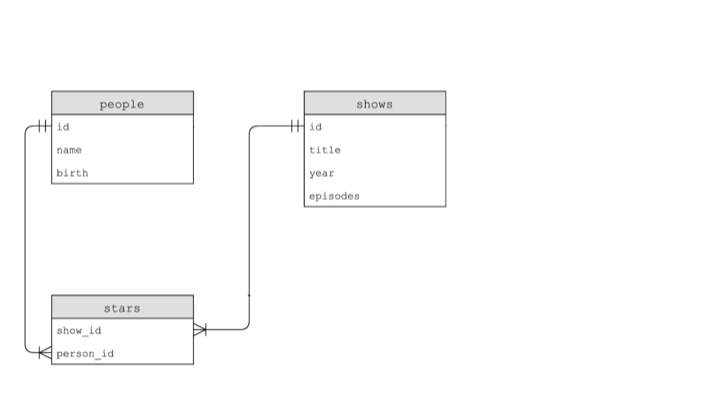
- The stars table has two columns: show_id and person_id. This junction table relates one table to another.
-
To find all people who starred in The Office (2005):
SELECT name FROM people
    WHERE id IN (
        SELECT person_id FROM stars
        WHERE show_id = (
            SELECT id FROM shows WHERE title = 'The Office' AND year = 2005
        )
    );
Notice the nested queries: we first find the show’s ID, then find all person_ids from stars, then get those people’s names.
-
To find all shows Steve Carell has been in using nested queries:
SELECT title FROM shows WHERE id IN ( SELECT show_id FROM stars WHERE person_id = ( SELECT id FROM people WHERE name = 'Steve Carell' ) ); -
The same query using explicit joins:
SELECT title FROM shows JOIN stars ON shows.id = stars.show_id JOIN people ON stars.person_id = people.id WHERE name = 'Steve Carell'; -
Or using an implicit join:
SELECT title FROM shows, stars, people
    WHERE shows.id = stars.show_id
    AND people.id = stars.person_id
    AND name = 'Steve Carell';
Notice how the comma-separated table names create an implicit join, with the
WHEREclause specifying the relationships.
Indexes
- Not all queries perform the same. If you have not indexed your database tables, queries can be slow.
-
An index allows you to optimize the underlying representation of data by creating a search structure for specific columns:
CREATE INDEX title_index ON shows (title);Notice that you give the index a name and specify which table and column(s) to index.
-
When you create an index, the database builds a B-tree data structure in memory:
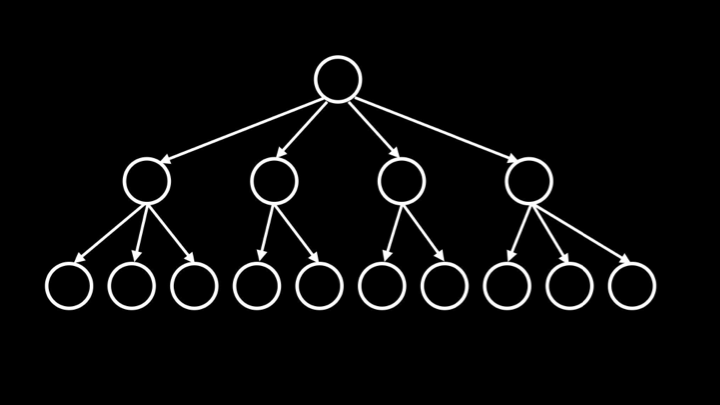
- A B-tree is a fairly wide tree with leaf nodes as close to the root as possible, giving logarithmic running time instead of linear search.
-
To see the effect, you can enable timing in SQLite:
.timer on - Before creating an index, a query like
SELECT * FROM shows WHERE title = 'The Office';might take 0.038 seconds. After creating the index on the title column, the same query takes essentially 0.000 seconds. - The trade-off: indexes take up additional space in memory, and for tables that are frequently updated, they might slow down insertions, updates, and deletions. But for the most common queries like searching, indexes provide significant speedups.
NoSQL
- An alternative approach to storing data is NoSQL, which stands for “not SQL” or “not only SQL.”
-
Instead of rows and columns, NoSQL stores documents or objects, often in JSON format:
{
    "_id": 386676,
    "title": "The Office",
    "stars": [
        {"id": 136797, "name": "Steve Carell"},
        ...
    ]
}
Notice that all related data is bundled together in one document rather than spread across multiple tables.
- The appeal of NoSQL is that you can grab all the data you care about right away. But you don’t necessarily benefit from the same constraints that a SQL database can impose, like uniqueness and referential integrity. Nor do you have features like indexes for efficient searching.
Race Conditions
- Race conditions can occur when multiple requests access the same database simultaneously.
- Consider a social media “like” button. The code might:
- Select the current number of likes:
SELECT likes FROM posts WHERE id = 13; - Add one and update:
UPDATE posts SET likes = 51 WHERE id = 13;
- Select the current number of likes:
- If two users click “like” at essentially the same time on different servers, both might read “50 likes,” both add 1 to get 51, and both update to 51, when the correct answer should be 52.
- This is like two roommates both checking an empty fridge, both going to buy milk, and both coming home with milk.
-
The solution is transactions and locks:
BEGIN TRANSACTION;
SELECT likes FROM posts WHERE id = 13;
UPDATE posts SET likes = 51 WHERE id = 13;
COMMIT;
Notice that transactions ensure both queries execute atomically, without interruption from other processes.
SQL Injection Attacks
- SQL injection attacks occur when programmers trust user input without sanitizing it.
-
Consider a login form where someone enters their email as
malan@harvard.edu'--: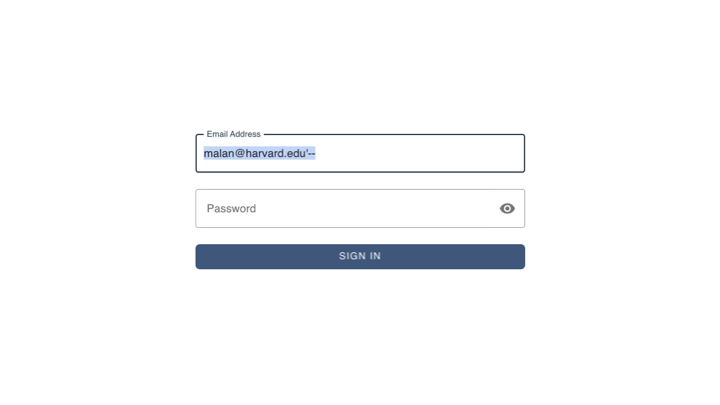
-
If the server naively constructs a query like:
SELECT * FROM users WHERE username = 'malan@harvard.edu'--' AND password = '...'Notice that
--starts a SQL comment, causing the password check to be ignored entirely. - The attacker could log in without knowing the password.
-
The solution is to never trust user input. Use parameterized queries with placeholders:
SELECT * FROM users WHERE username = ? AND password = ?Notice that the
?placeholders let the library handle proper escaping and sanitization. - Stand on the shoulders of others and use well-tested libraries to format SQL queries safely.
Summing Up
In this lesson, you learned about deploying databases at scale. Specifically, you learned…
- About different types of data storage: databases, data warehouses, data marts, and data lakes.
- How flat-file databases like CSV files store data in rows and columns.
- How relational databases use unique identifiers to relate data across tables.
- About SQL, Structured Query Language, for querying and manipulating data.
- The CRUD operations: Create, Read, Update, Delete.
- How to use
SELECT,INSERT,UPDATE, andDELETEcommands. - About primary keys and foreign keys for creating relationships.
- The difference between one-to-one, one-to-many, and many-to-many relationships.
- How to use joins and nested queries to combine data from multiple tables.
- How indexes speed up queries using B-tree data structures.
- About NoSQL as an alternative to relational databases.
- About race conditions and how transactions prevent them.
- About SQL injection attacks and how to prevent them with parameterized queries.
See you next time!